
 https://www.instagram.com/haveringwomens
 https://www.facebook.com/share/18ttjNDjHD/?mibextid=wwXIfr
Evidence shows Domestic Abuse rises during major football tournaments
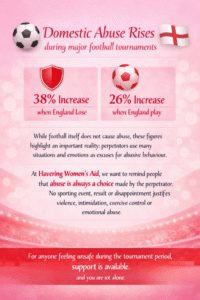
Football, Domestic Abuse and Why Awareness Matters
Major football tournaments bring excitement, community and celebration for many people. However, evidence has consistently shown that incidents of domestic abuse can increase during these events.
For anyone feeling unsafe, support is available, please reach out.
June is Pride Month a time to celebrate love, identity, and the vibrant diversity of the LGBTQ+ community. It’s also a time to acknowledge and support LGBTQ+ people who are affected by domestic abuse. Abuse can happen in any relationship, regardless of gender identity or sexual orientation, but LGBTQ+ survivors often face unique barriers when seeking help.
LGBTQ+ survivors of domestic abuse may face additional obstacles, such as:
Threats of being “outed” to family, friends, or at work
Fear of discrimination or not being believed
Family rejection or lack of safe support networks
Services that do not feel inclusive or understanding
Abuse related to identity, like controlling how someone expresses their gender or sexuality
Abuse in LGBTQ+ relationships can include:
Emotional and psychological abuse
Coercive control and isolation
Financial control and manipulation
Physical or sexual violence
Identity‑based abuse, such as “If you leave me, I’ll tell everyone you’re trans.”
Abuse is about power and control, not gender. Every survivor deserves to be heard, believed, and supported.
Our commitment to Inclusive Support
At Havering Women’s Aid, we are dedicated to providing support that is:
Non‑judgemental and confidential
Inclusive and respectful of all identities
Trauma‑informed and tailored to individual needs
No one should feel unsafe in their own home — and no one should feel unsafe asking for help.
You are not alone.
If you or someone you know is experiencing domestic abuse, especially within the LGBTQ+ community, it’s important to remember that help is available. You deserve to feel safe, respected, and supported.
This Pride Month and every month, Havering Women’s Aid is here for all survivors of domestic abuse.
Reach out to us if you need support.
MENTAL HEALTH AWARENESS WEEK 2026

11th – 17th May 2026
Supporting Survivors, Strengthening Wellbeing
Domestic abuse impacts mental health in deep and lasting ways.
This week, we raise awareness, promote understanding, and remind survivors.
You are not alone. Support is available.
#DenimDay 29.04.26
We wear Denim to stand with survivors and challenge victim-blaming.
Clothing NEVER causes abuse.
Responsibility always lies with the perpetrator.

Join us. Wear Denim. Start Conversations. The development of Denim Day began in Italy in 1992, when an 18-year-old girl was raped by her driving instructor. Initially, the perpetrator was convicted of indecent exposure in a public place, but after an appeal by the Survivor, he was convicted of all charges and sentenced to jail. However, a few years later, the perpetrator appealed his conviction and the Italian Supreme Court overturned the rape charge, arguing that the victim’s tight jeans implied consent, as she must have helped remove them.
UK emergency alerts: How to stay safe
A nationwide test of the UK’s emergency alert service will take place at 3pm on Sunday 7 September 2025. The alerts will warn you if there’s a danger to life nearby, such as flooding or fires.
However, we are concerned about the potential safety risks to survivors who may be keeping their phones hidden from an abuser, as the alert is a loud, siren-like sound with a screen message and vibration.
Survivors can opt out from receiving emergency alerts to avoid their device from being detected. Emergency Alerts will be sent to compatible mobile phones within an area of risk. Emergency alerts work on:
- iPhones running iOS 14.5 or later
- Android phones and tablets running Android 11 or later
The alert may still be received on earlier versions of Android. To check, search your device settings for ‘emergency alerts’.
How to opt out on iPhones and Android phones.
To opt out:
- Search your settings for ‘emergency alerts’.
- Turn off ‘severe alerts’ and ‘extreme alerts’.
Other mobile phones and tablets.
Depending on the manufacturer and software version of your phone, emergency alerts settings may be called different names, such as ‘wireless emergency alerts’ or ‘emergency broadcasts’.
The settings can usually be found in one of the following ways.
Go to:
- ‘message’, then ‘message settings, then ‘wireless emergency alerts’, then ‘alert’
- ‘settings’, then ‘sounds’, then ‘advanced’, then ‘emergency broadcasts’
- ‘settings’, then ‘general settings’, then ‘emergency alerts’
Then turn off ‘severe alerts’, ‘extreme alerts’ and ‘test alerts’.
Young Persons Violence Advisor
Available until July 2025
We support children and young people aged 16-25 who have been affected by domestic abuse.
Abuse can be from someone you are in a relationship with, or have been in a relationship with, it can also be from a family member. It can also happen after the relationship has ended. We can support you to make safer choices in your relationships.
YPVA’s provide one-on-one support to young people, helping them understand their experiences and offering guidance on how to stay safe. They advocate on behalf of the young person, ensuring their needs are met and their voices are heard.
YPVA’s educate young people about healthy relationships, consent, and the dynamics of domestic abuse. YPVA’s assess the risk levels of the young person and work with young people to develop personalised safety plans, which may include strategies for staying safe at home, school/college/work, and in the community.
YPVAs offer emotional support, helping young people process their experiences and build resilience.
Spotting The Signs of Domestic Abuse
- Do they constantly put you down?
- Do they make you feel stupid or worthless?
- Do they play mind games that make you doubt your judgement?
- Do they control your money or make sure you are dependent on them for everyday things?
- Do they tell you how you should spend your own money?
- Do they pressure you into having sex when you don’t want to?
- Do you feel you can’t say “no” to doing things sexually?